


How does a computer work?
What actually happens when a computer runs a task? With a single click, the processor, RAM, storage, and operating system work together to process data and produce a result.
FUNDAMENTALSCOMPUTER SCIENCEPOPULAR ARTICLEEVERYDAY TECHNOLOGIES
Lucas GRANDIER
8/31/20267 min read


What is a computer?
A computer is a programmable electronic machine capable of automatically processing data. Its operation is based on the execution of logical instructions carried out at very high speed thanks to electronic components.
In concrete terms, a computer transforms information into digital form in order to:
perform calculations
Store data
Run software
Show results
All the operations carried out by a computer follow the same principle:
Receiving data
Information Processing
Producing a result
This operation is mainly based on the interaction between hardware and software :
The general architecture of a computer
A modern computer consists of several specialized components that communicate with one another.
The processor (CPU)
The processor, or CPU, is the central processing unit. It interprets and executes program instructions.
The CPU primarily performs three types of operations:
arithmetic calculations
logical operations
data flow management
It contains several internal components:
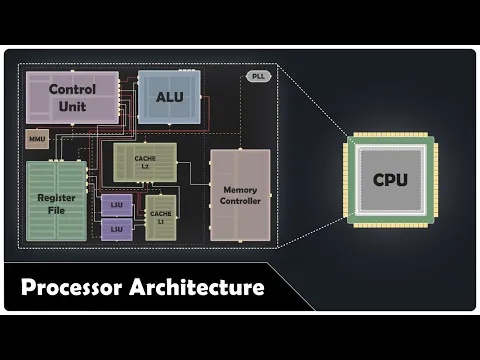
The frequency, expressed in GHz, indicates the number of clock cycles performed each second. It influences performance, but it is not enough to compare two processors: their architecture, number of cores, cache memory, and ability to execute instructions per cycle also play a role.
Random Access Memory (RAM)
RAM (Random Access Memory) is a type of volatile memory used to temporarily store data from programs that are currently running.
It provides the processor with quick access to the information it needs.


For example :
opening a web browser
running a video game
processing a video
All of these tasks use RAM.
When the computer is turned off, the data stored in RAM is lost.
Insufficient RAM causes :
slowdowns
memory overload
applications to close


Storage: SSD and HDD
Storage preserves data permanently.

There are two main technologies :
SSDs are much faster because they have no moving parts.
The storage contains :
the operating system
software
user files
The motherboard and communication buses
The motherboard connects all the components to each other.
It contains various circuits that enable:
power supply
data transfer
component synchronization


Peripherals
Peripherals are devices connected to a computer that enable the exchange of information with the user.
There are two main categories: input devices and output devices.
Input devices
Input devices are used to send data to the computer.
For example, the keyboard is used to enter text and commands, while the mouse is used to move the cursor and interact with the graphical user interface.
Output Devices
Output devices allow the computer to display the information it has processed.
The monitor displays images and text, while the printer allows you to print documents on paper.


RAM vs. storage: what's the difference?
RAM and storage have different roles. Storage retains data even when the computer is turned off, while RAM temporarily retains data and instructions used by running programs.
We can therefore retain:
SSD/HDD → retain data
RAM → temporarily store the data used
The graphics processing unit (GPU)
The GPU (Graphics Processing Unit) is a processor specialized in processing graphics data. It is particularly effective at performing a large number of similar operations simultaneously.
It is used in particular to generate the images displayed on the screen, but also in video games, 3D and video processing.
Unlike the CPU, which is designed to perform a wide variety of tasks, the GPU is particularly suitable for calculations that can be run in parallel.


Secure your cryptocurrencies with the right hardware wallet
A hardware wallet helps protect the private keys that give access to your cryptocurrencies, while allowing you to verify your transactions before signing them.
But between the different models available, the features, comfort level, and prices can vary.
Ledger, Trezor: discover our selection of the best hardware wallets on the market to find the model best suited to your use.
How data is processed ?
The binary system
The binary system is the fundamental language used by computers to represent and process information. It is based on a base-2 number system, consisting solely of two symbols: 0 and 1, known as bits (binary digits).
In electronic systems, this representation is particularly well-suited because logic circuits operate with two stable physical states:
Power is present (high level) → represented by 1
No power (low level) → represented by 0
This duality makes it possible to design systems that are reliable, fast, and resistant to electrical interference.
A sequence of bits forms a binary code, for example:


From binary to information
These sequences make it possible to represent any type of computer data.
All forms of digital information are converted to binary in order to be processed by the processor:
Text: Each character is associated with a numerical code defined by standards such as ASCII or Unicode
Images: represented by a matrix of pixels, each pixel being encoded in binary (color, intensity)
Sound: transformed into digital signals via sampling (quantization of sound waves)
Video: a succession of frames and audio tracks encoded in binary
What is the role of the operating system
The operating system is the essential software that keeps the computer running. It makes the link between the hardware components (processor, memory, hard drive, peripherals) and the software used by the user.
When a program is launched, the operating system organizes the data exchanges and allocates the resources necessary for the proper functioning of the computer.
It performs several important functions:
managing memory and the processor
launching and closing applications
organizing files and folders
controlling peripherals such as the keyboard, mouse, or monitor
ensuring system security and stability
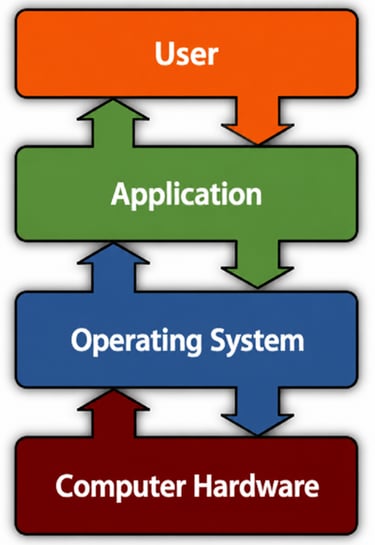
For example, when a user opens a web browser, the operating system loads the program into memory, communicates with the processor, and displays the interface on the screen.
The most commonly used operating systems are:
Windows
macOS
Linux
Without an operating system, the components of the computer would not be able to work together in an organized manner.
How a computer performs a task
When a user opens an application, several components are involved successively or in parallel. The operating system coordinates their exchanges in order to retrieve the necessary data, have it processed by the processor and display the result.
For example, consider an application that you launch from the desktop.
1. The user triggers an action
It all starts when you click on the app icon.
The mouse passes the action to the operating system, which identifies the application that the user wants to launch.
2. The operating system identifies the program
The operating system now needs to access the files needed to run the application.
These files are usually stored on the computer's SSD.
The operating system therefore asks the storage to retrieve the necessary data.
3. Data is loaded into RAM
The data recovered from the SSD is transferred to the RAM.
This step is important because the processor can access the data in RAM much faster than the data stored on the SSD.
4. The processor executes the instructions
The CPU then retrieves the instructions and data it needs from memory.
It executes these instructions, including arithmetic and logical operations and memory access.
This operation is based in particular on a repeated cycle: retrieving an instruction → decoding it → executing it
This cycle repeats very quickly to allow the program to work.
5. Other components are involved if necessary
The CPU does not necessarily perform all the operations alone.
For example, when an application needs to produce graphics, the system can use the GPU to perform some of the graphics calculations.
Other components can also be used depending on the task being performed: network, audio, storage, USB devices, etc.
6. The result is produced
The results of the various operations are then used by the application.
In the case of a GUI, the GPU can generate the images to be displayed while the operating system coordinates their transmission to the screen.
The user then sees the result of all these operations.


Remember: how does a computer really work?
A computer is not made up of components that work independently. The CPU, memory, storage, GPU, and peripherals work together, under the coordination of the operating system.
When a task is performed, data flows between these different components as needed:
Storage (SSD/HDD) keeps programs and files for a long time.
RAM temporarily contains the data and instructions used by programs.
The CPU executes the instructions and performs the necessary operations.
The GPU supports graphics processing and some parallel calculations.
The motherboard and its communication buses allow the various components to exchange data.
The operating system coordinates everything and manages access to hardware resources.
For example, when you open an application, the operating system retrieves its data from storage, loads it into memory, and then the processor executes its instructions. Other components can be involved depending on the task, before the result is finally presented to the user.
It's this collaboration between hardware and software that allows a computer to perform tasks as varied as launching an application, viewing a video, editing a photo, or viewing a web page.
🔎 Related articles :

Tech, simply.
Receive our new articles, tips and comparisons directly in your inbox.
©2026 The Tech BEHIND. All rights reserved
The Tech Behind participates in various affiliate programs. Some links on this site may generate a commission.